HexStamp
A downloadable tool for Windows
Development Process:
- On 1st paid download of a product, I release or develop the next update. On 3rd paid download of a product, I do another update. On 7th paid download, another update. On 12th, another. And again on 18, 25, 33, 42, 52, etc.
- To gain access to the updated versions of a file, a minimum price must be paid. Base product is free or donate. Update 1 is 1$. Update 2 is 2$, update 3 is 3$, so-on-and-so-forth.
- So if you like a thing you downloaded, toss me a buck so I know it's worth pursuing, and I'll continue development!
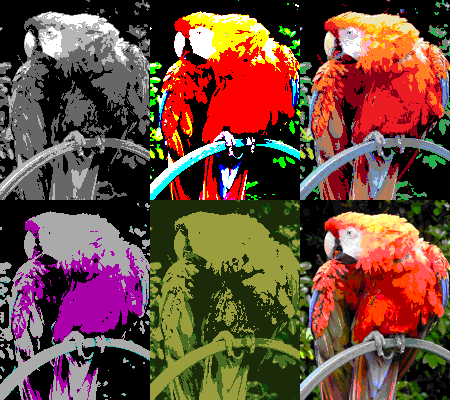
HexStamp – Palette-Based Image Recoloring Tool
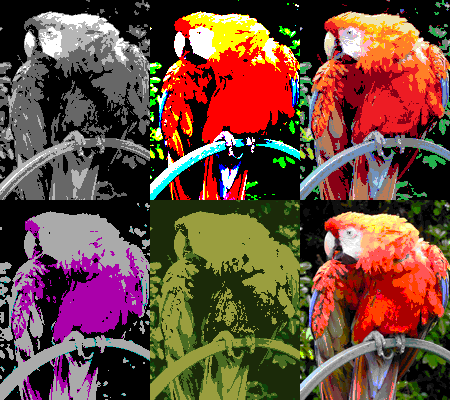
HexStamp is a fast, lightweight command-line utility for batch recoloring PNG images using a palette extracted from another PNG image.
It’s built for artists, pixel-art creators, and game developers who want a simple, deterministic way to apply a fixed color palette to many images at once—without editors, GUIs, or complex setup.
What HexStamp Does
HexStamp takes:
-
One palette image (any PNG)
-
One or more input images (PNG)
And for every pixel in every input image:
-
Compares its RGBA color to all colors in the selected palette
-
Finds the closest match using per-channel deviation (R, G, B, A)
-
Replaces the pixel with that palette color
The recolored images are saved as new files, leaving the originals untouched.
Typical Use Cases
-
Palette swapping pixel art
-
Enforcing a strict color palette across multiple sprites
-
Recoloring assets for different factions, themes, or biomes
-
Preparing assets for retro or limited-color pipelines
-
Batch-processing PNGs without opening an image editor
How to Use (Quick Overview)
-
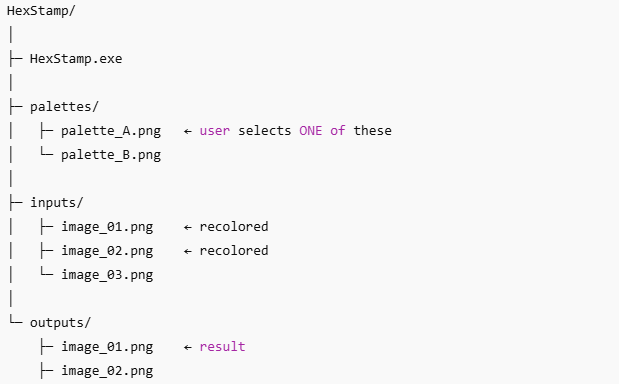
Put one or more PNG images into the
palettesfolder
(each image represents a possible color palette) -
Put the PNG images you want to recolor into the
inputsfolder -
Run
HexStamp.exe -
Choose options from the numbered list menu prompts
-
Find the recolored images in the
outputsfolder
HexStamp will show live progress for each image and report completion when finished.
Features
-
✔ Batch processing (handles multiple images automatically)
-
✔ Full RGBA support (alpha is preserved and matched if present in palette)
-
✔ Deterministic results (same input + palette = same output)
-
✔ Very fast (color caching + optimized loops)
-
✔ No runtime dependencies
-
✔ Portable single executable (Windows)
Important Notes
-
HexStamp works only with PNG files (I might expand this later)
-
All pixels in the palette image are considered valid palette colors
-
Output images overwrite files with the same name in
outputs -
This is a command-line tool, not a GUI application
Included Libraries
HexStamp uses stb_image and stb_image_write by Sean Barrett
(these libraries are public domain / MIT-style licensed).
AI Assistance Disclosure
Parts of HexStamp’s design and implementation were developed with assistance from OpenAI’s ChatGPT.
All final decisions, testing, integration, and distribution were performed by the author
Download
Click download now to get access to the following files:
Development log
- HexStamp 2.056 days ago
Comments
Log in with itch.io to leave a comment.
This looked promising to me but you get MSVCP140D.dll is missing.
MSVCP140D.dll is a dynamic link library file which belongs to a developer's application called Microsoft Visual Studio. Since all of my friends are software devs... I'm not surprised this was overlooked when I had them test it.
Luckily, you don't need to be a programmer. It should be included in the 2015 C++ runtime! That comes straight from Microsoft.
Did that runtime fix the issue? If it didn't, I would like to know so I can investigate other potential causes.
no, I couldn't install the 2015 c++ runtime link you have. It gives an error that i already have a newer version on my system. I believe the D in the DLL name means you compiled it in debug mode. If you compile it as a release it should link to MSVCP140.dll which is distributed to end users.
I have finally released version 2.0. Your input was extremely helpful in this upgrade. I hope the newly released version actually works for you, I believe I have fully overcome the original defect. (A redundant setting in VisualStudio, I overlooked) I have also added a variety of new features to improve its usability!